Showing posts with label Facebook. Show all posts

Saturday, October 18, 2014

Top 10 Twitter Tips for Bloggers for Blogging

 To Blogging for Bloggers presenting the top 10 Twitr Tips

Step 1 Update Your Twitter Profile
Under settings you can add a uniform resource locator, make sure this link is your blog address. This means that when you get new followers and they view your profile they’ll have a direct link to your blog.
 

Step # 2 Twitter is the new RSS
When you visit any established blog you will see the orange RSS feed in the top right hand corner. Now most people won’t check their RSS feed everyday, but most twitter users will, hence I think twitter will be the new RSS. At the moment a standard button for twitter hasn’t been established, but you should be adding an image next to the RSS link that points to your twitter page.
 

Step # 3 Follow The Leaders In Your Industry
When you first start out you’ll probably know a few people you want to follow, but it’s quite daunting to figure out who the movers & shakers are in the Twitersvere. If you Follow MrTweet you will be given a list of people who you should be following. If you’ve posted a few updates and a good bio then some of these people will follow you back, so let the networking begin.
 

Step # 4 Install TweetDeck 
Once you install this software onto your computer it opens up a whole new twitter experience.
When someone your following updates it will ping and let you know someone has tweeted. It allows you instantly reply to updates, and it will monitor for anyone who replies to one of your tweets. No more frantically refreshing the homepage to get that twitterfix!
 

Step # 5 The TweetMyBlog Plugin
This nifty plugin allows me to have my twitterfeed in the sidebar of my blog.
It will also automatically update my twitter account everytime I make a new post, and if you have established good relationships then you should see instant traffic.
 

Step # 6 The Sociable Plugin
Once installed this plugin makes it easy for readers to share your content. Be sure to tick the “TweetThis” function so that people can tweet about your blog post in seconds. Providing you produce good Pillar Content the amount of extra traffic could be huge.
 

Step # 7 Use Search To Get Found
Have you seen people post updates with a #nerdpickuplines or similar? If you use the search function then you will this is a way of trending and picking out what is popular. By tweeting about popular topics not only will you have topics to chat about at the watercooler but you’re being part of the community, which will bring more traffic back to your blog.
 

Step # 8 Use ViralTweets instead of E-mail Capture
The thinking about offering a free report in exchange for your readers email is that you can follow-up and email them about new blog posts. Whilst email lists are fantastic the chances of ytour reader telling all their friends about the free report are pretty slim. If you study the offer on my sidebar you’ll see that anyone who tweets the message automatically follows me, and posts a link to my main website – long term much more valuable than an individual address.
 

Step # 9 Be Yourself
Twitter is a big social network that works on the basis of “What Are You Doing?
If all you’re doing is blasting adverts over the twitter network then you’re not going to make any friends, and you’re wasting your time. Conversely if you use it a “Micro Blogging” site and post things that aren’t worth whole blog posts it will work fantastically well for you, and help establish a relationship with the readers of your blog.
 

Step # 10 The Power Of The Re tweet
This final point is probably the most important for traffic generation.
When someone you’re following posts a link to a blog post and you like the content you go to tweetdeck and hit the little arrow button. This automatically re-tweets the link to the content, and shows your followers you’ve found an article you think they would like to read. By re-tweeting great content you will gain the respect of your followers, and get on the radar of the person who wrote the content.
Finally if do write a hot topic article then be sure to make sure to tell people that you want it re-tweeted.
With that in mind if you found this post helpful then copy this into tweet deck and hit enter
10 Twitter Tips For Bloggers – Please Re-tweet http://TwitPWR.com/3JH
Once you’ve done that be sure to leave a comment and include your twitter link, I will follow back anyone who comments.
Happy Tweeting

7 Top Photo Sharing Tools for Twitter

Excellent Photo Sharing Tools for Twitter.


In all its greatness Twitter does not offer direct image sharing. Whether this is good or bad is up to you to decide. But because of that, a large number of third-party services have been developed to fill that need. I made a list of the 7 most popular photograph sharing for Twitter. I will sort the list alphabetically. 
  • Picktor is a social picture management service & community that enables users to manage their photos, share their photos, and interact with multiple online communities. Did I mention it is very simple to use? And it uses Twitter’s oAuth implementation, so you can be sure your Twitter login details are safe.
  • Pikchur is a multi-platform simple service that updates your social networks / micro-blogging platforms with pictures. Sign up is optional, you can just login with one of their many supported platforms and start sending your pictures right away.
  • Pixim is another simple tool for photo sharing on Twitter. Simply login via Twitter and post photos.
  • TweetPhoto offers a number of advanced options, such as stats, geo-tagging, favoriting and many more. I wrote more about it in myprevious post. Here as well you login with your Twitter account.
  • Twitgoo is another simple photo sharing tool. When you login (with your Twitter login), it looks much like Twitter web interface, except that you can attach photos to your tweets.
  • TwitPic is currently the largest and most popular image sharing service for Twitter. Due to its popularity, there are also popular twitter clients that have built-in support for TwitPic. Do I have to mention you can use it with your Twitter login & password
  • yfrog comes from the guys behind ImageShack and you can bet it is very simple to use. Upload, log in (yes, with your Twitter account), share and that’s it. Simple and fast.

Tips to Hacking Twitter.


What's up Hey Hi, What are you doing right now?
That's what Twitter answers in a text message of 140 characters or less. This networking tool is something bloggers use to publicize writings, companies use to elicit brand promotion, and people use to network. Here are ten Twitter hacks to better understand and leverage this new social networking tool.

Step 1- Be reTweet Worthy.
The biggest compliment you can get on Twitter is a retweet (RT). I’ve posted 2000+ tweets and maybe have been retweeted less than 1% of the time.
 
Step 2- Gossip Boy.
‘OH’ is when you “overhear” something juicy and tweet it as OH. This is in contrast to citing and sourcing, “@larryChiang’s Drunk tttrs are funny”. Gossip girls and boys, relish in the guilty comfort and anonymity within the confines of an ‘OH’.
 
Step 3- Pick a Twitter Thesis.
Twitter generalists bore. Twitter granularists bore most when they ‘report’ on cereal consumption and choice. Solution: pick a thesis or at least a general focus. My focus is “What They Don’t Teach You At B-School”.
 
Step 4- Twitter Ambush.
Some elements of a good military ambush are positioning, preparation, monitoring and of course surprise. Position and preparation are functions of what you selected as your focus. Monitor via Summize. A twitter ambush is where people walk into your expertise and your material springs into action.

Step 5- Squat a Hashtag.
Conversations can be hash-tagged to get tweets organized. For example, “#SXSW08″ is SXSW in Austin and if my math serves me right, #SXSW09 will be next year ;-) . In March I’m hosting #VCsecrets as a panel. In the comments below add your hash-tags to various conversations.

 
Step 6- Reciprocaters Only.
Ratios on Twitter are very important. The Friend to Followers ratio should be 1:1. Friends are those you follow. The Follow-Unfollow-Follow maneuver is used on someone who isn’t following you. What this does is sends an email notifying you are now following them (even though you were following them all along).
 
Step 7- Follow Passion Topics on Summize.
Use twitter search engine called Summize to find tweets about your thesis/focus. You can also use alerts based on keywords.
 
Step 8- Oops, I Did Mean to Turn You On
Twitter mistakes are fun and can help communicate a message. Depending on your newbie status, you can ‘fail forward’. For example,
“Favorite @tylerWillis”
This mistake I made when Mr Tyler Willis reTweeted and re-posted a Businessweek post of mine.
‘Unfollow @gregarious’ is when I didn’t really stop tracking Greg, but wanted to fire a shot across his bow after he talked smack at #BWE08.
 
Step 9- TinyURL to Promote.
There are website shorteners for when you’re tweeting a link. This helps you stay under 140 characters. You may have heard of RSS. Twitter is similar to RSS but made slightly more personal.
 
Step 10- Live tweet something.
Have access to something newsworthy, informational or breaking?! Live tweet it.
CNN loves the Twitter and your live tweets might make it onto cable TV for hundreds to see.
 
Step 11- Read your DMs and @ replies.
Twitter newbies don’t realize that there are DMs – direct messages and @ replies — public DMs. For example, @arielK might tweet “@larryChiang AfterParty at W.” I’d miss it if I didn’t hit my “@replies” from my twitter home page.
 
Step 12- Host a Twitter Contest
High brow intellectuals furl at the thought of doing a contest. Me, I have 700 followers because I’ll bribe, tip, comp and bribe people to read my twitter. I said bribe twice because nearly every contestant is a winner.
{CONTEST} Tweet ur fave TIP and WIN a gift card! http://tinyurl.com/twitter20 or http://tinyurl.com/6ak7r2 #larrychiang to play
 
Step 13- Pre-publish a Chapter Except via Twitter
There’s an urban legend that a book is getting written via Twitter 140 characters at a time. Maybe its a sequel to “What They Don’t Teach You At Stanford Business School.”

Steps and Tricks to Successful Twitter Microblogging.

10 Steps and Tricks to Successful Twitter Micro-blogging.

 
People have been searching for the formula to finding value out of twitter.  My previous post on 10 steps to finding business value in twitter.  Now that you're using twitter, you'll find these will launch your experience and value into hyperspeed.
I use SharePoint as my community example throughout, if you're not a SharePoint person you can easily replace with .NET or whatever.
 
Step 1. Twitter to Facebook - Add the facebook twitter app athttp://apps.facebook.com/twitter then put in your twitter account.  One draw back... if you tweet a lot you get a lot of wall posts, including replies.  It does say it comes from twitter so the techy people should understand, but your family may be confused.  It does allow for a nice interestingthread discussion on your wall.
 
Step 2. Blog to Twitter (to Facebook) -  Twitterfeed.com as simple as logging in and putting in your RSS.  I suggest putting "Blog:" so we can tell immediately what this is.  Cool thing it can automatically be shortened even.
 
Step 3. Twitter & Blog to FriendFeed - Yet another aggregation service, but I like this one better than legit.  FriendFeed.com consolidates all your twittering and blogging and flickr and about 50+ other services.  Scoble is recommending it based on the ability to see what you're doing across the web.  My initial feedback is, yes it's worth it.  You don't have to spend any time there, but it is a decent way to provide web consolidation of your various feeds.  This will make your twitters and all the rest available via RSS via a "Home Feed"  (You can view and subscribe to my friend feed athttp://friendfeed.com/joeloleson)
 
Step 4. Twitter to blog with Twitter Widgets - You may or may not have seen my recent post on SharePoint Widgets and Webparts.  The Twitter widget that you see on my blog is from widgetbox.com.
 
Step 5. Use Global Search - On twitter.com in "Find People" you can search. http://twittersearch.com/statuses?searchstring=sharepoint orhttp://search.twitter.com/search?q=%23sharepoint If you search for SharePoint, you can see recent tweets where people use the term "SharePoint."  The real value I've found in tweetdeck the ability to add a search for "SharePoint." There are always some interesting tweets from people who are having conversations, people needing help, or people beyond help.  Tweet deck adds a pane so you can watch your normal following, plus this pane.  I'm also a fan of the twitscoop pane.  If you follow twitscoop you can add this pane.  This will show you current trends, from Windows7 to DOW to Palin.  The latest SNL Palin with Tina Fey... if it's any good :).  You'll stay ahead of the days trends and news minus the commercials and repetition.  Without doing much I can simply do a quick scan and see how I can help people in the SharePoint community.  Obviously it's much easier to do when they follow me or @ contact me.
Using search.twitter.com you can actually subscribe to the RSS feed of query.  http://search.twitter.com/search.atom?lang=en&q=sharepoint
 
Step 6. Use Hashtags - hashtags.org has setup indexing if you follow @hashtags and use one.  Check out their site hashtags.org for more information #SharePoint, whether you follow hastags or not, it will be much easier for all of us to see your posts if you include #SharePoint or SharePoint in your interesting SharePoint posts.  Many events will have special tags like #TEUS08 (Teched US 2008) or #Gartner (Gartner Symposium).  Hashtags will give you visibility outside your followers as people search or even retweet these tags.
olivermarks #cse I'm at Cloud Summit Executive conf at Computer museum mountain view ca, high end saas business discussion
#Gartner new analyst video now available on YouTube:www.youtube.com/gartnervideo
More on hashtags on the twitter wiki.  That's another place to learn and get better.  There are some people that are annoyed by hashtags and would prefer you use the new Track options.  I don't want IM notifications, I simply want to be able to filter the relevant community related content.
 
Step 7. Follow to be followed - Enter your real name in your profile.  If you search for your full name and can't find yourself, how can anyone else?  Those who understand the value of twitter, understand that those you follow dictate the level of interesting conversation.
Secret: I follow people who follow SharePoint.  This means I look at the followers of SharePoint, SharePoint MVPs, and MS SharePoint people.  I now follow over 1000 people and see 10 tweets every 5 minutes.  I went from having a tight following of just SharePoint folks to a much broader base of SharePoint Users, Admins, Developers, and people who occasionally complain about SharePoint amongst other social networking and news contacts.
 
Step 8. There's MORE! It's not just marketing or lame status updates - I actually find a lot of conversations revolve around development, support, even venting can be therapeutic. :) Let me give you a glance into the future.  Today there's a lot of people who don't get microblogging.  They wouldn't see twitter as a place to go for answers... cause what can you really get in 140 characters?  In the future people will say... I do a search or pose my question to my favorite microblogging interface and ask my 5000 friends (followers) and within seconds I can have the answer and a source (URL.) Your following becomes very valuable.  Think about the millionare game show.  If you could ask your 60 second million dollar question to twitter, google, or facebook.  You'd have a different experience on each.
LLiu Finally! Someone said "everyone is a marketer - support, dev, etc." I heart you man! :-) Social media not just a marketing thing. #nms08
Step 9. Retweet incredible things and big announcements - RT at the beginning of your post means ReTweet.  This is a way of passing on an important or incredible message.  It's amazing what you can fit in 140 characters, but these will give you visibility.  I recently retweeted where someone lost their teenager daughter.  In the next 10 minutes I saw the message retweeted a half dozen times.
RT @genochurch's 14 yr old daughter is missinghttp://tinyurl.com/5yodvb. Please retweet! (via @tranqy)
This one spread like wildfire on twitter.  I see a rate of 20 tweets per minute of this tweet now.  <Update>More like 250 per minute according to this article</update>
Step 10. Twitter Mashups and Community - There is so much possibility here.  When you mashup maps and twitters you get twittervision.com andtwitspy.com.  Look at election.twitter.com and you can imagine a sharepoint.twitter.com where you see the top recent tweets and topics and realtime rolling search results.

MAKE A CHANGE TO FACEBOOK LOGIN BACKGROUND QUICK FREE USING GOOGLE CHROME

STEPS TO CHANGE FACEBOOK LO GIN BACKGROUND:

Before, Change Facebook Login Background Let me tell you can use & follow the simple method to Change Facebook Login Background. This is not really difficult you need to download the following chrome extension.
Step 1) You Need To Download, First of all, Go to FACE BOOB Refresh Chrome Extension.
Step 2) Go to the download link, & Click FREE, then confirm by clicking Add button.

Step 3) After adding the plugin to Google Chrome, visit chrome://chrome/extensions/ to access all Chrome extension settings.
Step 4) currently scroll down till you discover the put in extension (FB Refresh), then Click choices slightly below it.

Step 5) When you click Options, you will be redirected to settings page of FB Refresh.
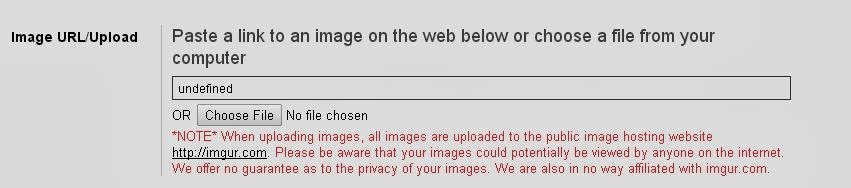
Step 6) Under Image (uniform resource locator) URL/Upload section you can paste the Image URL that you can find on Google Image Search or simply Upload an image ofyou.
Step 7) you have to Click on Save button within the bottom of the page.

Step Note*: Click On Download Button,  Change Facebook Login Background Quickly Extention, & Then View The Right Corner Wait For 5 Seconds, & then Click on Skip Ad. your Download will there. Further The New Versions Will Be Uploaded. You Can Tap For Change Facebook Login Background Quickly Extention.
** Pls Note :Before Activating Must Check ReadMe File Present There In a RAR File And Follow The Simple Instruction.

Trick in Facebook to Post in All Groups in Few Sec

Facebook – Post in All Groups in Few Secound

Make you Facebook Auto Posting on Groups it will take Less time and Post Fast on Groups.
Steps How to Do That.
Step 1 First Goto this Link :
Step 2 Then Open Facebook.
Step 3 Right Click and Select Inspect Element
Step 4 Click on Console Enter the Script Code and Press Enter .
Step 5 When you will Press Enter The box will popup on Facebook you will Enter your Message that you want to Post in All Groups that you have Joined on Facebook.
Step 6And Then Click Submit.

In Few Sec.. The Status or Links Will be Posted on Facebook And It will ask you to Refresh and Done..
Warning

Steps 2 Secure your FB account from a new Facebook virus !! 


Facebook virus has infected more than 20K users..Beware

new facebook virus


Facebook viruses have been around for a while, but lately I’ve seen them cropping up even more frequently. You get a Facebook virus when you click on a link that installs malicious code or if you allow an untrusted application access to your account.

What to do if you too are infected from this virus ?

The first thing you have to do when you discover you have a Facebook virus is change your fbpass

Finally, check to be sure the app isn’t lurking on your account. It’s probably not, but it’s good to be sure and now is a good time to clean out the apps you’re not using any more anyway. To check the apps connected to your account, follow these messages

Step 1) Go to Account > Privacy Settings

Step 2) Click the Edit your Settings link under Apps and Websites.


Step 3)Click the top Edit Settings button (by Apps You Use).
 
The Apps You Use page comes up listing all the apps you’ve allowed to have access to your account.(Mostly the app is named Xperia or HTC)
 
Go through the list and be sure you know each and every one of the apps.
If you’re unsure if the app is trusted or if you want to remove an app.
new facebook virus
 Step 4) Click the Edit Settings button next to the app.

new facebook virus
Step 5) Click the Remove the app.

Step 6) Thatch it and you are safe now